Get the Flip 3D Vista effect on XP

Since its launch about a year ago, Windows Vista has been widely criticized for several reasons: security restrictions, poor usability, lack of actual new features when compared to XP…

Top Recommended Alternative
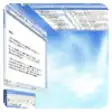
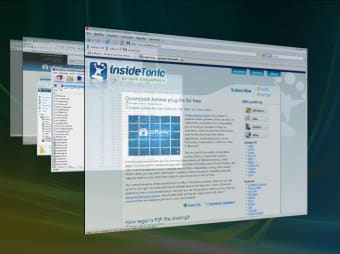
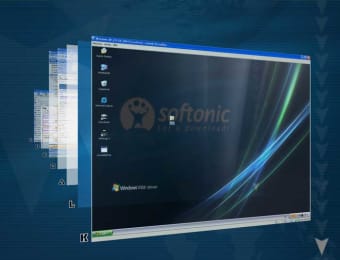
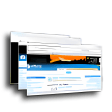
But what nobody complained about was the cool eye-candy included in Microsoft's new operating system, such as the 3D system to switch between active applications. What's more, this particular Vista feature has been turned into a software tool that enables you to enjoy that same 3D window switcher in Windows XP.

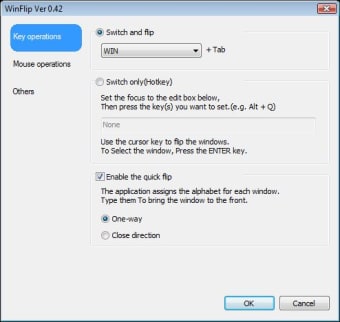
WinFlip is very easy to use. Simply unzip the file (no installation required), launch the program and you're ready to go. If you want to use it instead of the standard Alt+Tab, press the Windows key+Tab combination. All your active apps and opened windows will be displayed in an attractive 3D environment, where you can flip among them by pressing Tab repeatedly or choose a certain window by pressing the key associated with it.

WinFlip worked fine during our tests, although sometimes the content of some of the windows turned to complete white or complete black while flipping through them. I guess it's just a matter of further development.

WinFlip is an easy, simple - and above all, very cheap - way to have the 3D Flip function in Windows XP.

  • Pros

    • No installation required
    • Can be used alternatively to standard Alt+Tab
  • Cons

    • Sometimes windows appear covered in white or black
 0/4

App specs

  • License

    Free

  • Version

    0.50
  • Latest update

  • Platform

    Windows

  • OS

    Windows XP

  • Language

    English

    Available languages

    • Danish
    • English
    • Spanish
    • Italian
    • Portuguese
    • Russian
    • Chinese
  • Downloads

    184.3K

    Last month's downloads

    • 25
  • Size

    612.98 KB

  • Developer

Program available in other languages


Icon of program: WinFlip

WinFlip for PC

  • Free
  • 3.9
    397
  • 184.3K
  • V0.50

User reviews about WinFlip

3.9

3 reviews

Add review

Main reviews for you

  • Anonymous user

    Great. If you have windows 8 developer preview, it works with that as well, and it is great!! Only down side is that it shows quite a number of inbuilt metro stuff that is of no use.and very light on cpu and memory too.letter font could be a bit clearer though Pros: Attractive customizable design that is very light on memory and cpu and gives us a feature that works with both xp and later operating systems. Ability to replace alt-tab app switcher which i find more natural than win-tab Cons: letter font is hard to see clearly

  • Anonymous user

    Winflip 0.50 freeze and down . I have the same problem as apimio with the 0.50 version. I tried it on 2 very different machines, I don't know what is the problem. I like it, but when I need to restart it twice a day, I do not use. I modified all the settings, but nothing help. Any idea? I try this older one. Pros: Beautiful, and funny. I love it. Cons: If it goes down again and again I hate.

  • Anonymous user

    Good Idea ...but. Is a very good idea (thinking that Xp still alive yet, maybe for a long time). I'd test it by some months but I have a lot's of problem. When I'm switching between applications this go down and freeze my PC for a time.Is very attractive, quick and easy to handle, but is not funny to have to turn on every time that it crash :p Pros: Nice, quick and easy to use. Cons: for some reason i have a lot of crash when I'm switching apps

More

You may also like

Alternatives to WinFlip

Explore Apps

Latest articles

Laws concerning the use of this software vary from country to country. We do not encourage or condone the use of this program if it is in violation of these laws.
Softonic

Is WinFlip safe?

100/100

Score result: Clean

This file passed a comprehensive security scan using VirusTotal technology. It is safe to download.

  • Virus free
  • Spyware free
  • Malware free
  • Verified by Security Partners

    VirusTotal logo

Scan Info

Last scan
Friday, December 8, 2023
Scan provider
VirusTotal · Full report

File Integrity

File
WFlip050.zip
SHA256
bf310a4f1e162a863c2024c57232b3cfeea0a06c33ad691848ec0a507083a07d
SHA1
5c5e9aed1e0531fc388aa4902096b017dd013cde

Softonic security commitment

WinFlip has been thoroughly scanned by our advanced security systems and verified by industry-leading partners. This file comes from the official developer and has passed all our security checks, showing no signs of viruses, malware, or spyware. For more information, visit our Security and Trust Center